Cloud Email Microservices: A Guide to Using AWS Lambda and Cloudflare Workers
Deploy an email microservice on Lambda and handle queues — invoke from Cloudflare Workers or any Node.js backend
Summarize with AI:
You’ve developped your contact page and want to send emails on submit?
In this article, we’ll see how to send emails for free using:
A third-party email API, with a comparative of the existing solutions.
AWS Lambda to host the email microservice.
Your app’s backend in Node.js or in remix.run meta-framework, hosted on Cloudflare workers in a microservices architecture.
You will learn to:
Create an email microservice using AWS Lambda and AWS SQS queue.
Create a Cloudformation template and a SAM template.
Deploy to AWS in a reproducible way.
Publish an event to AWS using
@aws-sdk/client-sqsfrom your Node.js/Remix app.Create a microservice in Cloudflare using Cloudflare Workers and wrangler.
This cloudflare worker will hold the event-publication logic, so that other workers can just call it to invoke our AWS-email-sending-logic.
You can check out the whole code on my Github’s repo.
For compatibility reasons, I’ll use libraries that work on cloudflare workers.
Cloduflare workers don’t actually run on Node.js but on V8 isolates, which is the same browser engine on which runs Chrome & Chromium.
Create an email FaaS with AWS Lambda
We can use any email sending solution:
| Email API Service | Free Tier / Trial | Free Tier Limit | Notes on Free Tier | Pricing After Free Tier (Example) | Rate limit in free tier |
|---|---|---|---|---|---|
| Resend | Yes | 3,000 emails/month, 100 emails/day | Generous free tier with 1 custom domain, 1-day data retention, ticket support. Extra is blocked once monthly quota is reached. | Pro: $20/month for 50,000 emails; Scale: $90/month for 100,000 emails; Dedicated IP add-on available | 2 emails per second |
| SendGrid | Yes | 100 emails/day for 60 days | Good for small volume and testing | Paid plans from $19.95/month for 50k emails | ~600 API requests per minute limit on most endpoints |
| Mailgun | Yes | 100 emails/day | Trial for first month | Starts at $35/month for 10k+ emails | ~300 messages/min |
| Postmark | No free tier, pay-as-you-go | No free tier | Focused on deliverability | $15 for 10,000 emails | |
| Amazon SES | Yes for first 12 months | 3,000 emails/month | AWS ecosystem integration | $0.10 per 1,000 emails after free tier | 14 emails/second with burst up to 28 emails/second for new accounts, adjustable on request |
| MailerSend | Yes | 12,000 emails/month | Large free tier for small teams. Extra costs $1.00/1000 emails | Plans start at $15/month | |
| Brevo (Sendinblue) | Yes | 300 emails/day | Daily sending limit | Paid plans from $15/month | |
| Elastic Email | Yes | 100 emails/day | Small daily free tier | Paid plans start around $9/month | |
| Mailtrap | Yes, mainly for testing | 3,500 emails/month | Intended for staging/testing | Paid plans start at $10/month |
When it comes to pricing, Brevo, Mailertrap, Amazon SES and Resend seem to be good options.
I’m gonna go with Resend for its dashboard, which allows to do CSV exports.
All email APIs have a rate limit. With Resend, if you send more than 2 emails per second you’ll receive a rate limit error (429). Hence, instead of making a direct call to the Email API you should use a queue system.
Consuming emails (Pub/Sub)
In a queue system, we have publishers and subscribers. The publisher creates the job to be processed. The subscriber listens to a queue. When a job arrives, we say it gets consumed.
In our context, when a mail needs to be send we create a job in the queue. The job handler is subscribed to the queue and sends the email using Resend API.
Leverage cloud platforms queue systems
To keep things simple, we’ll use cloud platforms FaaS (Functions as a Service) alongside the queue system they offer, as this costs nothing and consumes less resources.
We can setup our email microservice using:
Cloudflare with a cloudflare worker and cloudflare queues.
AWS: A lambda function with Amazon Simple Queue Service (SQS).
Cloudflare queues are available starting 5 USD$/month, which is out of scope for this challenge.
→ We go with AWS.
Implement AWS Lambda email microservice
The email to send must be validated. Let’s use yup (we’ll se why later).
1234567891011121314151617181920212223242526272829303132333435363738394041424344454647484950export const schema = yup .object({ to: recipientsSchema, // single or multiple recipients from: senderSchema, subject: yup.string().required(), html: yup.string(), text: yup.string(), }) .test( "html-or-text-required", "Either html or text must be provided", function (value) { return !!(value?.html || value?.text); }, );// single recipientconst recipientSchema = yup.object({ name: yup.string().nullable().optional(), email: yup.string().email().required(),});// multiple recipientsconst recipientsSchema = yup.lazy((value) => { if (Array.isArray(value)) { return yup.array().of(recipientSchema).required(); } return recipientSchema.required();});const senderSchema = yup .object({ name: yup.string().nullable().optional(), email: yup.string().email().required(), }) // .transform((value, originalValue) => { if ( originalValue === undefined || originalValue === null || (typeof originalValue === "object" && originalValue !== null && Object.keys(originalValue).length === 0) ) { return undefined; } return value; }) .optional();We allow the input to have either one recipient or an array of recipients.
Each recipient has an optional name and a required email.
The sender is optional, and its name is optional.
Send an email using Resend
To contact Resend API we use their npm library resend. We’ll respect these conditions:
In case of rate limit error, retry after the throttle duration.
The fields to and from must take the form
${recipient.name} <${recipient.email}>or simplyrecipient.name.
12345678910111213141516171819202122232425262728293031323334353637383940414243import { Schema } from "../schema";import { CreateEmailOptions, Resend } from "resend";import { getRecipientsField, getSenderField } from "../helpers/email";// Resend has a limit of 2 emails per secondconst retryAfter = 500;export async function sendEmail(body: Schema, resend?: Resend) { if (!resend) { throw new Error("Resend instance is required"); } const payload: CreateEmailOptions = { from: getSenderField(body.from), to: getRecipientsField(body.to), subject: body.subject, html: body.html, text: body.text, react: undefined, }; const { data, error } = await resend.emails.send(payload); if (error) { if (isResendRateLimitError(error)) { await sleep(retryAfter); return sendEmail(body, resend); } // Throw to trigger Lambda retry and DLQ if needed throw new Error(JSON.stringify({ ...error, payload })); }}function isResendRateLimitError(error: unknown): boolean { if (typeof error !== "object" || error === null) return false; // Resend SDK returns the error as a plain Error with a message string const message = (error as Error).message; return message?.includes("rate_limit_exceeded");}async function sleep(ms: number): Promise<void> { return new Promise((resolve) => setTimeout(resolve, ms));}123456789101112131415161718192021222324252627import { RecipientSchema, RecipientsSchema, SenderSchema } from "../schema";export const getSenderField = (sender?: SenderSchema) => { if (!sender) { return `${process.env.FROM_NAME} <${process.env.FROM_EMAIL}>`; } if (sender.name?.trim()) { return `${sender.name} <${sender.email}>`; } return sender.email;};export const getRecipientsField = ( recipient: RecipientsSchema,): string | string[] => { if (Array.isArray(recipient)) { return recipient.map((r) => getRecipientField(r)); } return getRecipientField(recipient);};const getRecipientField = (recipient: RecipientSchema) => { if (recipient.name?.trim()) { return `${recipient.name} <${recipient.email}>`; } return recipient.email;};Authenticate to a third-party API from AWS Lambda
The call to Resend email API must be authenticated. Its API key has to be stored securely. For that usage, we’ll use AWS Secret Manager (SSM).
Create the secret in SSM.
To retrieve the secret, normally we bind variables using their keys in the function’s configuration.
However, this means it will be visible in the function’s environment configuration.
As an alternative, we can get the SSM secret at runtime by using@aws-sdk/client-secrets-manager.
1234567891011121314151617import { SecretsManagerClient, GetSecretValueCommand,} from "@aws-sdk/client-secrets-manager";async function getResendApiKey(): Promise<string> { const client = new SecretsManagerClient({}); const command = new GetSecretValueCommand({ SecretId: process.env.RESEND_SECRET_NAME, }); const response = await client.send(command); if (!response.SecretString) { throw new Error("Resend API key not found"); } return response.SecretString;}Now let’s see the main logic: how does our our lambda function handle Amazon SQS messages?
Implent an AWS SQS message handler
To handle messages from SQS queues, we export an handler of type SQSHandler:
12345678910111213141516171819202122232425262728293031323334353637383940const allowedSenderEmails = (process.env.ALLOWED_SENDERS || "contact@example.com").split(",");export const handler: SQSHandler = async (event: SQSEvent) => { const resend = new Resend(await getResendApiKey()); const failedRecords: SQSBatchResponse["batchItemFailures"] = []; for (const record of event.Records) { try { if (!record.body) { throw new Error("Invalid input"); } const body = JSON.parse(record.body); await validateBodyAsync(body); // Validate sender email if provided if (body.from_email && !allowedSenderEmails.includes(body.from_email)) { throw new Error( `Sender email ${body.from_email} is not allowed. Allowed emails: ${allowedSenderEmails.join(", ")}`, ); } await sendResendEmail(body, resend); } catch (err) { console.error(err); failedRecords.push({ itemIdentifier: record.messageId, }); } } if (failedRecords.length > 0) { return { batchItemFailures: failedRecords, }; }};The batchItemFailures return value is used to tell Lambda which specific messages in the batch failed so that AWS can requeue only those failed ones instead of retrying the entire batch.
Without batchItemFailures, when one message fails, the whole batch fails.
This can lead to:
Duplicate processing of successful messages.
Longer processing times.
Higher costs (if you opted for a premium email plan)
Configure and invoke the Lambda Function using SAM
The lambda function can be invoked either with Serverless Framework, etiher AWS SAM (Serverless Aplication Model). The main difference is that the serverless framework is multi-cloud, while SAM is AWS-only (deeply integrated). For simplicity we’ll use AWS SAM, as everything is built-in.
1234567891011121314151617181920212223242526272829303132333435# More information about the configuration file can be found here:# https://docs.aws.amazon.com/serverless-application-model/latest/developerguide/serverless-sam-cli-config.htmlversion = 0.1[default.global.parameters]stack_name = "prod-notification-service-sh"[default.build.parameters]cached = trueparallel = true[default.validate.parameters]lint = true[default.deploy.parameters]capabilities = "CAPABILITY_IAM"confirm_changeset = trueresolve_s3 = trues3_prefix = "prod-notification-service-sh"region = "eu-west-3"[default.package.parameters]resolve_s3 = trues3_prefix = "prod-notification-service-sh"output_template_file = "packaged.yaml"[default.sync.parameters]watch = truestack_name = "prod-notification-service-sh"[default.local_start_api.parameters]warm_containers = "EAGER"[default.local_start_lambda.parameters]warm_containers = "EAGER"To invoke the function we need to simulate an SQS event, which we’ll do inside a jest test case.
1234567891011121314151617181920212223242526272829303132333435363738394041424344454647484950515253545556import type { SQSEvent, SQSMessageAttributes, SQSRecordAttributes,} from "aws-lambda";import { handler } from "../src";import type { Schema } from "../src/schema";import { v4 as uuidv4 } from "uuid";describe("Unit test for app handler", function () { it("sends text email", async () => { const emails: Schema[] = [ { to: { email: "YOUR_EMAIL@gmail.com" }, subject: "Test Email", text: "This is a test email.", }, ]; const events = getSQSEvents(emails); const result = await handler(events, {} as any, () => {}); // Add assertions here to verify the email was sent correctly });});const getSQSEvents = (emails: Schema[]): SQSEvent => { const attributes: SQSRecordAttributes = { ApproximateReceiveCount: "0", SentTimestamp: "1630456800000", SenderId: "", ApproximateFirstReceiveTimestamp: "1630456800000", }; const messageAttributes: SQSMessageAttributes = { dummy: { dataType: "String", stringValue: "dummy", }, }; const event: SQSEvent = { Records: emails.map((email) => ({ messageId: uuidv4(), receiptHandle: "", attributes, messageAttributes, md5OfBody: "", md5OfMessageAttributes: "", eventSource: "", eventSourceARN: "", awsRegion: "eu-west-3", body: JSON.stringify(email), })), }; return event;};To run the test, add ”test”: “jest” to your package.json, then run pnpm run test.
Deploy your lambda function
Still for simplicity, we’ll use CloudFormation to deploy the Lambda function and the queues.
We don’t want to do that with Terraform as lambda function’s code would get in the TF state.
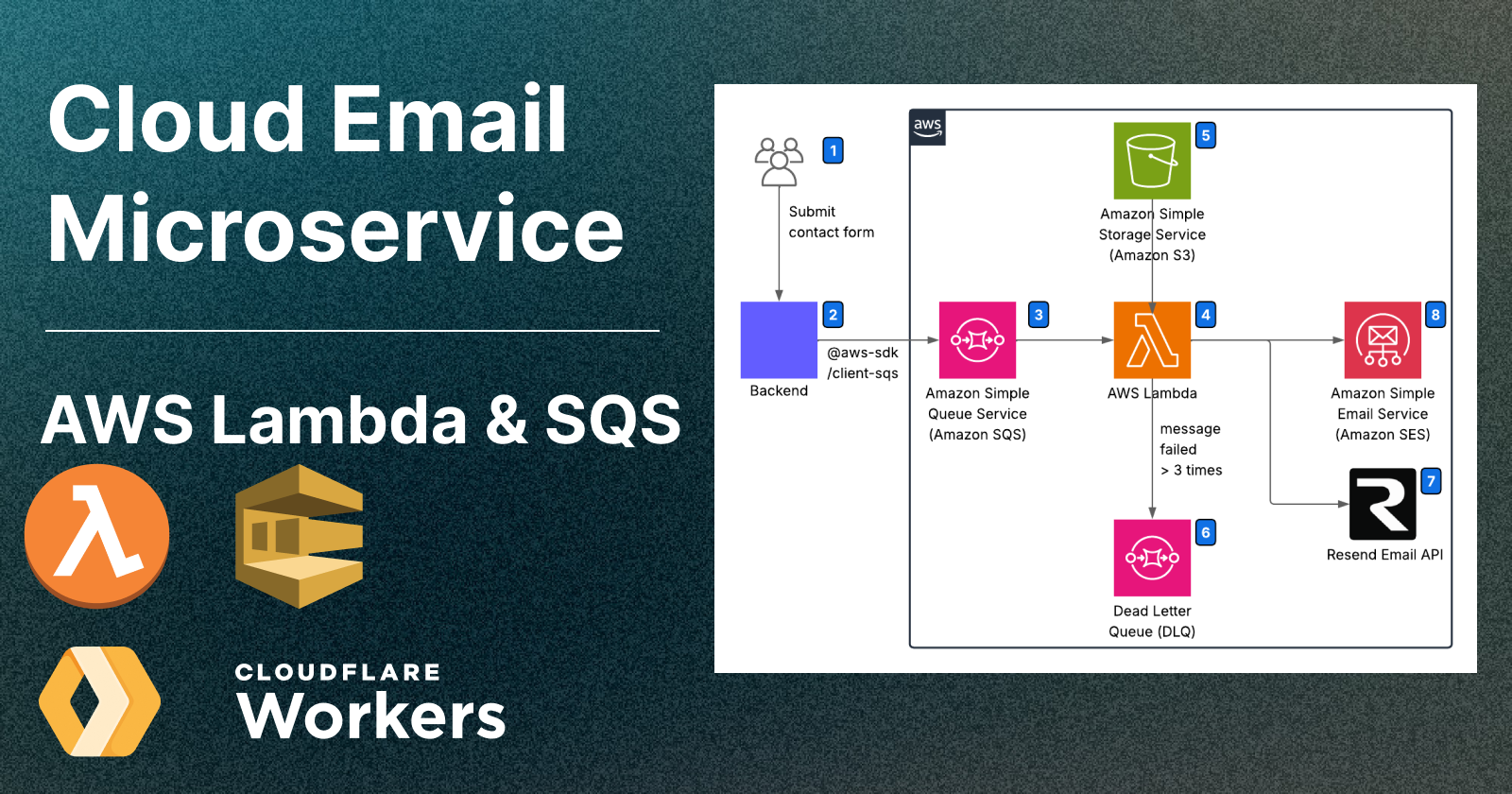
The deployment will follow this architecture:

Frontend: Submits contact form, makes an anonymous POST request to the backend.
Backend: The backend (based on Node.js or V8 isolate) receives the email to send, and publish a job in the SQS.
Amazon SQS: Holds the emails to send.
AWS Lambda: Subscribe to the queue (3) and process the emails by sending them through a supported email API (6) or (7)
S3 Bucket: hosts the lambda function’s code. It’s implicitly created using CloudFormation.
Dead Letter Queue: Holds the messages that have failed to be processed 3 times.
Resend: Email API (requires to store a secret in SSM)
AMAZON SES: Email API (no secret required as it’s part of AWS ecosystem)
Let’s setup the CloudFormation template.yaml:
123456789101112131415161718192021222324252627282930313233343536373839404142434445464748495051525354555657585960616263646566676869707172737475767778798081828384858687888990919293AWSTemplateFormatVersion: "2010-09-09"Transform: AWS::Serverless-2016-10-31Description: > A serverless application that processes email notifications from an SQS queue.Globals: Function: Timeout: 30 MemorySize: 256 Tracing: Active LoggingConfig: LogFormat: JSON Environment: Variables: EMAIL_SERVICE: "resend" FROM_NAME: "Your Firm" FROM_EMAIL: "contact@example.com" ALLOWED_SENDERS_EMAILS: "contact@example.com" RESEND_SECRET_NAME: "prod-notification-service-resend-api-key"Resources: NotificationServiceLambda: Type: AWS::Serverless::Function Properties: FunctionName: prod-notification-service-sh-lambda CodeUri: ./ Handler: dist/src/index.handler Runtime: nodejs20.x Architectures: - x86_64 Events: SQSEvent: Type: SQS Properties: Queue: !GetAtt SQSQueue.Arn BatchSize: 2 Enabled: true Policies: - SQSPollerPolicy: QueueName: !GetAtt SQSQueue.QueueName - Statement: - Effect: Allow Action: - ses:SendEmail - ses:SendRawEmail Resource: "*" - Statement: - Effect: Allow Action: - logs:CreateLogGroup - logs:CreateLogStream - logs:PutLogEvents Resource: "*" - Statement: - Effect: Allow Action: secretsmanager:GetSecretValue Resource: arn:aws:secretsmanager:YOUR_REGION:YOUR_ACCOUNT_ID:secret:prod-notification-service-* SQSQueue: Type: AWS::SQS::Queue Properties: QueueName: prod-notification-service-sh-queue VisibilityTimeout: 120 RedrivePolicy: deadLetterTargetArn: !GetAtt DeadLetterQueue.Arn maxReceiveCount: 3 DeadLetterQueue: Type: AWS::SQS::Queue Properties: QueueName: prod-notification-service-sh-deadletter-queue MessageRetentionPeriod: 1209600 # 14 days in secondsOutputs: NotificationServiceLambda: Description: Notification Service Lambda Function ARN Value: !GetAtt NotificationServiceLambda.Arn SQSQueueURL: Description: URL of the SQS Queue Value: !Ref SQSQueue SQSQueueARN: Description: ARN of the SQS Queue Value: !GetAtt SQSQueue.Arn DeadLetterQueueURL: Description: URL of the Dead Letter Queue Value: !Ref DeadLetterQueue DeadLetterQueueARN: Description: ARN of the Dead Letter Queue Value: !GetAtt DeadLetterQueue.ArnDefine these scripts in your package.json:
1234567"scripts": { "build": "rm -rf dist && tsc && sam build", "deploy": "pnpm run build && sam deploy --disable-rollback", "delete": "aws cloudformation delete-stack --stack-name prod-notification-service-sh --region eu-west-3", "log": "sam logs -n NotificationServiceLambda --stack-name prod-notification-service-sh --tail", "test": "jest"},To deploy the cloudformation template and lambda code all in one:
Create the password directly on Amazon SSM’s dashboard.
Note: In the github repo, SSM password is created using terraform.
Run
pnpm run deploy.
This transpiles from JS to TS, zips the code usingsam buildand deploys it usingsam deploy.
This will create the CloudFormation stack prod-notification-service-sh in your configured region. You can watch the resources it contains in AWS CloudFormation service in AWS Console.
If you need to reset it, run: aws cloudformation delete-stack --stack-name prod-notification-service-sh --region YOUR_REGION
Everything is now up and running!
Publish an event to AWS SQS
If we manage to publish an event to queue our lambda function is listening to, our email will be sent.
You can directly use @aws-sdk/client-sqs to publish an event. However, if you have 10 applications calling your lambda function, this may be very redundant.
If your app is based on remix.run and running on Cloudflare Workers, I recommend to make a Cloudflare Worker whose unique role is to publish email jobs to Amazon SQS:

User submits the contact form to your app
Worker app: Your app makes an simple HTTP call to your mail-worker
Worker email microservice: Your mail-worker handles SQS event publication.
Grafana Loki: Monitor eventual errors by publish errors to Loki.
SQS Queue: Holds email events in queue
To publish eventual errors to Loki and receive alerts via email, you can follow these steps:
Set Up Grafana Cloud Account: Create an account on Grafana Cloud, which provides access to Loki, a log aggregation system.
Configure Loki: Integrate Loki with your application to collect logs. You can use the Loki API or a compatible logging library to send logs from your application to Loki.
Create Alerts in Grafana: In Grafana, set up alert rules based on the logs collected by Loki. You can define conditions that trigger alerts, such as specific error messages or log patterns.
Set Up Email Notifications: Configure Grafana to send email notifications when an alert is triggered. You can do this by setting up an email notification channel in Grafana and linking it to your alert rules.
If you're using the Cloudflare starter plan, prefer Cloudflare Worker Tailing to tail your worker logs.
Loki is push-based (the worker pushes the logs to loki using workers-loki-logger), while tailing is pull-based. Even if the cloudflare worker fails at startup, the tailed logs are still retrieved, which is not the case when using push-based methods.
Let’s implement the worker-email-microservice
1234567891011121314151617181920212223242526272829303132333435363738394041424344454647484950515253545556575859606162636465666768697071727374757677787980818283848586878889909192939495import { Logger } from "workers-loki-logger";import { SQSClient, SendMessageCommand,} from "@aws-sdk/client-sqs";type Bindings = { AWS_SQS_ACCESS_KEY_ID: string; AWS_SQS_SECRET_ACCESS_KEY: string; AWS_SQS_REGION: string; AWS_SQS_QUEUE_URL: string; LOKI_SECRET: string; LOKI_URL: string; ENVIRONMENT: string;};function getLogger(context: ExecutionContext, env: Bindings) { return new Logger({ cloudflareContext: context, lokiSecret: env.LOKI_SECRET, lokiUrl: env.LOKI_URL || "https://logs-prod-eu-west-0.grafana.net", stream: { worker: "newsletter-worker", environment: env.ENVIRONMENT, }, });}async function handleSendEmail( req: Request, env: Bindings, ctx: ExecutionContext, logger: Logger,): Promise<Response> { const sqsClient = new SQSClient({ region: env.AWS_SQS_REGION, credentials: { accessKeyId: env.AWS_SQS_ACCESS_KEY_ID, secretAccessKey: env.AWS_SQS_SECRET_ACCESS_KEY, }, }); const parsedBody = await req.json(); const command = new SendMessageCommand({ QueueUrl: env.AWS_SQS_QUEUE_URL, MessageBody: JSON.stringify(parsedBody), }); console.log(`Sending email to SQS: ${JSON.stringify(command)}`); const result = await sqsClient.send(command); return result.$metadata.httpStatusCode === 200 ? new Response("Email queued in SQS") : Response.json({ status: 500, message: "Failed to queue email in SQS", requestId: result.$metadata.requestId, });}export default { async fetch( req: Request, env: Bindings, ctx: ExecutionContext, ): Promise<Response> { const logger = getLogger(ctx, env); logger.mdcSet("requestUrl", req.url); try { const url = new URL(req.url); // Send email directly on POST request if (req.method === "POST" && url.pathname === "/send-email") { return handleSendEmail(req, env, ctx, logger); } logger.error( "Route not found", new Error(`Route ${req.method} ${url.pathname} not found`), ); return new Response("Not found", { status: 404 }); } catch (error) { logger.error("Caught error", error); return new Response(JSON.stringify({ error: "Internal server error" }), { status: 500, headers: { "Content-Type": "application/json" }, }); } finally { await logger.flush(); } }}Specify required secrets in .dev.vars for local development:
12345AWS_SQS_ACCESS_KEY_ID=AWS_SQS_SECRET_ACCESS_KEY=AWS_SQS_REGION=eu-west-3AWS_SQS_QUEUE_URL=LOKI_SECRET=Specify LOKI_URL in wrangler.toml.
To deploy the worker to production, run:
123456789pnpm install# Define all secrets on remote worker.# On the first time, it will also create the worker.npx wrangler secret put -e production AWS_SQS_ACCESS_KEY_IDnpx wrangler secret put -e production AWS_SQS_SECRET_ACCESS_KEYnpx wrangler secret put -e production AWS_SQS_REGIONnpx wrangler secret put -e production AWS_SQS_QUEUE_URLnpx wrangler secret put -e production LOKI_SECRETpnpm run deployDeploy to production using: pnpm run deploy.
Call your worker-email-microservice
Any other worker can now make an HTTP call to worker-email-microservice's binding to send an email.
Add the binding to your worker apps (NOT THE MICROSERVICE)
Let’s say your contact page runs on the worker
landing-page-worker. Update itswrangler.jsoncconfiguration with aNOTIFICATIONbinding toworker-email-microservice.
Note: If you use environments, specify the environment-specific binding in addition to the top-level bindings
1234567891011121314151617181920{ "services": [ { "binding": "NOTIFICATION", "service": "notification", "environment": "production" } ], "env": { "production": { "services": [ { "binding": "NOTIFICATION", "service": "notification", "environment": "production" } ] } }}- Send a email from
landing-page-workerusing a simple HTTP request to theNOTIFICATIONbinding.
12345678910111213141516171819202122232425262728const res = await context.cloudflare.env.NOTIFICATION.fetch( new Request(`https://dummy/send-email`, { method: "POST", body: JSON.stringify({ to: { name: `${firstName} ${lastName}`, email: email, }, subject: `${subject}`, txt, html, }), headers: { "Content-Type": "application/json" }, }) ); if (!res.ok) { const errorData = await res.json(); return Response.json( { success: false, error: errorData.message || "Failed to send email", }, { status: res.status, } ); }So proud, everything runs without additional costs :’)
I’m just wondering why my email quota keeps getting reached, I know I’m not that famous 🫠
Let’s check the dashboard one second…

Suspicious, huh?

I’ve made a whole article to prevent your forms from getting spammed (with code implementations), I really recommend getting through it to avoid such surprises: https://antoninmarxer.hashnode.dev/7-ways-to-stop-form-spam-in-remix-nodejs
Quick Summary
The resulting cost is just $1/month—essentially the AWS SSM fee for storing a single key.
I’d say that counts as solving the challenge of building a quasi-free email sending service.
You’ve now learned how to:
Create an email microservice using AWS Lambda and AWS SQS queue.
Create a Cloudformation template and a SAM template.
Deploy to AWS in a reproducible way.
Publish an event to AWS using
@aws-sdk/client-sqs.Create a microservice in Cloudflare using Cloudflare Workers and wrangler.
Tell me what you think of this stack!
What’s your go-to setup for sending emails in your apps, and why did you choose it?
Table of Contents
- Create an email FaaS with AWS Lambda
- Implement AWS Lambda email microservice
- Send an email using Resend
- Authenticate to a third-party API from AWS Lambda
- Implent an AWS SQS message handler
- Configure and invoke the Lambda Function using SAM
- Deploy your lambda function
- Publish an event to AWS SQS
- Let’s implement the worker-email-microservice
- Call your worker-email-microservice
- Quick Summary
Comments (0)
No comments yet. Be the first!